- Home Page /
- Electronics /
- Computers, Laptops and Tablets /
- Computer Accessories /
- Drawing Tablets /
- XP-Pen Deco 03 Wireless 2.4G Digital Graphic ...
0 ratings

Item #:
39826493
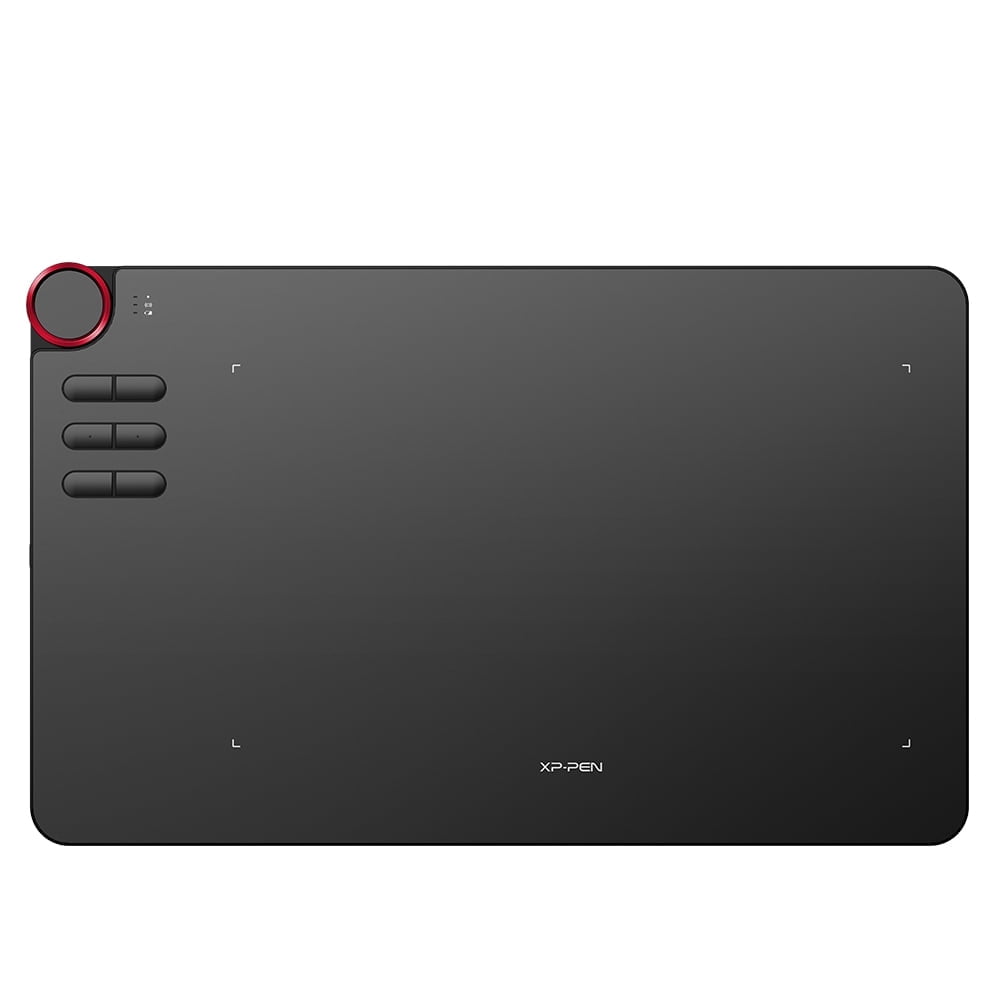
XP-Pen Deco 03 Wireless 2.4G Digital Graphic Drawing Tablet Battery-Free Passive Stylus 6 Shortcut Keys 8192 Pressure
Item #:
39826493
ZAR 1870
Price Details
Excluding Shipping & Custom charges ( Shipping and custom charges will be calculated on checkout )
*All items will import from US
0 ratings
Write a review
In stock
 Imported from USA store
QTY:
Order now and get it around Friday, August 14
Secured transaction
Ubuy works hard to protect your security and privacy. Our advanced payment security system ensures confidentiality by encrypting your information during transmission using AES (Advanced Encryption Standards) and SSL (Secure Socket Layer) protocols. Your payment details are 100% secure as we do not share your payment details with third party sellers.
Our Top Logistics Partners


A Beloved Multi-function Red Dial Design!

Fast
Shipping

Free
Return*

Secure Packaging

100% Original Products

PCI DSS Compliance

ISO 27001 Certified


Note: Step Down Voltage Transformer required for using electronics products of US store (110-120). Recommended power converters Buy Now.


What Stands Out
Wireless Connectivity
The XP-Pen Deco 03 offers seamless 2.4G wireless connection, eliminating the hassle of cords and providing freedom of movement for artists, enhancing their creative process.
Battery-Free Stylus
Equipped with a battery-free passive stylus, this tablet ensures a consistent, uninterrupted drawing experience without the need for charging, making it ideal for long sessions.
Customizable Shortcuts
With six customizable shortcut keys, users can optimize their workflow by easily accessing frequently used tools and features, significantly increasing productivity during art creation.
Product Details
- Multi-function Red Dial design for easy control with no friction
- Wireless and wired USB capability for flexible use
- Increased Report Rate of 266 RPS for smoother lines and better performance
- Ambidextrous design for both right and left-hand users
- Six customizable express keys and a dial for efficient workflow
- Compatible with Windows® 10/8/7, Mac OS X® 10.10 and above, and major designer software
Dangerous Goods
To avoid the delay in customs clearance process for Dangerous Goods, the shipment shall be opened at our warehouse facility to check the severity of hazardous components. Please see the list of Dangerous goods here.
Who Should Buy?

-
Digital Artists
Ideal for digital artists seeking a versatile drawing experience with high pressure sensitivity and customizable shortcuts.
-
Graphic Designers
Perfect for graphic designers looking for a wireless tablet that enhances workflow and creativity with precision.
-
Students & Educators
Beneficial for students and educators in art and design fields, offering a reliable and budget-friendly drawing tool.

-
Casual Users
Not suitable for casual users who want basic drawing options without the need for advanced stylus features.
-
Mobile Creators
Less ideal for artists who frequently work on the go, as the tablet may be less portable than desired.
-
Traditional Artists
Not recommended for traditional artists who prefer using physical media rather than transitioning to digital tools.
Product Description
XP-Pen Deco 03 Wireless 2.4G Digital Graphic Drawing Tablet Battery-Free Passive Stylus 6 Shortcut Keys 8192 Pressure
Have any Query? Chat with us
Customer Questions & Answers
-
Question:
How to Shop XP-Pen Deco 03 Wireless 2.4G Digital Graphic Drawing Online From Ubuy?
Answer: It’s easy to shop XP-Pen Deco 03 Wireless 2.4G Digital Graphic Drawing online from Ubuy. You just have to search for the product, choose your shipping method while checking out and get it delivered to your location. -
Question:
Is XP-Pen Deco 03 Wireless 2.4G Digital Graphic Drawing Available to Shop Online in South Africa?
Answer: Yes, at Ubuy South Africa this product is available for you to shop at a reasonable price. The XP-Pen Deco 03 Wireless 2.4G Digital Graphic Drawing is not available locally but you can trust us with our express shipping services. -
Question:
How Long Does It Take to Get Product After Placing the Order?
Answer: The delivery time of your ordered product varies as per what you've ordered and the shipping method that you've chosen. The estimated delivery time is mentioned during the checkout process, so be carefree while shopping.
XP-Pen Drawing Tablets Editorial Review
The XP-Pen Deco 03 Wireless 2.4G Digital Graphics Drawing Tablet Drawing Pen Tablet with Battery-Free Passive Stylus and 6 Shortcut Keys (8192 Levels Pressure) 10x6 Inch is a great device for general use with web browsing and drawing. The tablet has received positive reviews due to its sturdy build quality, smooth and accurate lines, and great pen pressure. The device is more affordable compared to its competitors, like the Intous Pro, and has amazing specs. The installation of the driver and connecting the Deco 03 to a PC is also easy. The customer support is also commendable. However, there are some Cons to Consider. Some settings with Windows and Photoshop have to be manually adjusted so that the software would detect the pen’s pressure. Another drawback is that the package does not include the XP-PEN thumb drive. In some cases, the delivery takes longer than expected. Nevertheless, the XP-Pen Deco 03 is still a fantastic and affordable device coming from an equally amazing company.
Customer Reviews & Ratings
1 customers ratings
-
5 Star
100%
-
4 Star
0%
-
3 Star
0%
-
2 Star
0%
-
1 Star
0%
Review this product
Share your thoughts with other customers
Pros
- Great for general use with web browsing and drawing
- Sturdy build quality
- Smooth and accurate lines
- Great pen pressure
- More affordable compared to competitors
- Amazing specs
- Easy installation of driver and connecting to PC
- Commendable customer support
Cons
- Some settings with Windows and Photoshop have to be manually adjusted so that the software would detect the pen’s pressure.
Product Price History
Important information
- Limitations : For products shipped internationally, please note that any manufacturer warranty may not be valid; manufacturer service options may not be available; product manuals, instructions, and safety warnings may not be in destination country languages; the products (and accompanying materials) may not be designed in accordance with destination country standards, specifications, and labeling requirements; and the products may not conform to destination country voltage and other electrical standards (requiring use of an adapter or converter if appropriate). The recipient is responsible for assuring that the product can be lawfully imported to the destination country. When ordering from Ubuy or its affiliates, the recipient is the importer of record and must comply with all laws and regulations of the destination country.
- Not all the products listed on Ubuy are for sale, as Ubuy is a global search engine. Products are subject to export/trade regulations.
ZAR 1870
Order now and get it around Friday, August 14
This item is not restrict in my country.(Please click on above link if this item is not restrict in your country, So our team will review and allow.)
QTY:
Secured transaction
PCI DSS compliant and ISO 27001:2022 certified, with encrypted payments and full buyer protection on every order.
Our Top Logistics Partners
Fastest cross-border delivery
Features & Benefits
- Multi-function Red Dial for easy control
- Wired and wireless USB capability
- 266 RPS for smoother lines and faster performance
- Designed for both right and left-hand users
- 10 x 5.62 inch working area for more space
- Ultra-thin and ergonomically designed
Ubuy Assurance
Experience worry-free shopping with 100% original products, PCI DSS-compliant payment security, ISO 27001-certified data protection, the fastest cross-border delivery, free returns *, and secure packaging on every order.