- Home Page /
- Electronics /
- Computer Accessories /
- Computer Accessories & Peripherals /
- Keyboards, Mice & Accessories /
- Computer Keyboards /
- Learn to Type Keyboard; Typing Practice Show ...
0 ratings
![Learn to Type Keyboard; Typing Practice Show or Hide Keys; Blank Key Caps; Teach Students Touch Typing; Keyboarding Mechanical Training Tool; Better Than Covers or Skins [1]](https://m.media-amazon.com/images/I/71trEF8eaQL._AC_SX679_.jpg)
![Learn to Type Keyboard; Typing Practice Show or Hide Keys; Blank Key Caps; Teach Students Touch Typing; Keyboarding Mechanical Training Tool; Better Than Covers or Skins [1]](https://m.media-amazon.com/images/I/81Cgys1YROL._AC_SX679_.jpg)
![Learn to Type Keyboard; Typing Practice Show or Hide Keys; Blank Key Caps; Teach Students Touch Typing; Keyboarding Mechanical Training Tool; Better Than Covers or Skins [1]](https://m.media-amazon.com/images/I/81AoPim-pwL._AC_SX679_.jpg)
![Learn to Type Keyboard; Typing Practice Show or Hide Keys; Blank Key Caps; Teach Students Touch Typing; Keyboarding Mechanical Training Tool; Better Than Covers or Skins [1]](https://m.media-amazon.com/images/I/81lUm7eIspL._AC_SX679_.jpg)
![Learn to Type Keyboard; Typing Practice Show or Hide Keys; Blank Key Caps; Teach Students Touch Typing; Keyboarding Mechanical Training Tool; Better Than Covers or Skins [1]](https://m.media-amazon.com/images/I/81QjYkZS-WL._AC_SX679_.jpg)
![Learn to Type Keyboard; Typing Practice Show or Hide Keys; Blank Key Caps; Teach Students Touch Typing; Keyboarding Mechanical Training Tool; Better Than Covers or Skins [1]](https://m.media-amazon.com/images/I/81xmmChNB7L._AC_SX679_.jpg)

![Learn to Type Keyboard; Typing Practice Show or Hide Keys; Blank Key Caps; Teach Students Touch Typing; Keyboarding Mechanical Training Tool; Better Than Covers or Skins [1]](https://m.media-amazon.com/images/I/71trEF8eaQL._AC_SY355_.jpg)
![Learn to Type Keyboard; Typing Practice Show or Hide Keys; Blank Key Caps; Teach Students Touch Typing; Keyboarding Mechanical Training Tool; Better Than Covers or Skins [1]](https://m.media-amazon.com/images/I/81Cgys1YROL._AC_SY355_.jpg)
![Learn to Type Keyboard; Typing Practice Show or Hide Keys; Blank Key Caps; Teach Students Touch Typing; Keyboarding Mechanical Training Tool; Better Than Covers or Skins [1]](https://m.media-amazon.com/images/I/81AoPim-pwL._AC_SY355_.jpg)
![Learn to Type Keyboard; Typing Practice Show or Hide Keys; Blank Key Caps; Teach Students Touch Typing; Keyboarding Mechanical Training Tool; Better Than Covers or Skins [1]](https://m.media-amazon.com/images/I/81lUm7eIspL._AC_SY355_.jpg)
![Learn to Type Keyboard; Typing Practice Show or Hide Keys; Blank Key Caps; Teach Students Touch Typing; Keyboarding Mechanical Training Tool; Better Than Covers or Skins [1]](https://m.media-amazon.com/images/I/81QjYkZS-WL._AC_SY355_.jpg)
![Learn to Type Keyboard; Typing Practice Show or Hide Keys; Blank Key Caps; Teach Students Touch Typing; Keyboarding Mechanical Training Tool; Better Than Covers or Skins [1]](https://m.media-amazon.com/images/I/81xmmChNB7L._AC_SY355_.jpg)
![Learn to Type Keyboard; Typing Practice Show or Hide Keys; Blank Key Caps; Teach Students Touch Typing; Keyboarding Mechanical Training Tool; Better Than Covers or Skins [1]](https://m.media-amazon.com/images/I/71trEF8eaQL._AC_SX569_.jpg)
Item #:
84267228
Learn to Type Keyboard; Typing Practice Show or Hide Keys; Blank Key Caps; Teach Students Touch Typing; Keyboarding Mechanical Training Tool; Better
Item #:
84267228
ZAR 1855
Price Details
Excluding Shipping & Custom charges ( Shipping and custom charges will be calculated on checkout )
*All items will import from US
0 ratings
Write a review
In stock
 Imported from USA store
QTY:
Only 11 items left in stock.
Order now and get it around Saturday, July 25
Secured transaction
Ubuy works hard to protect your security and privacy. Our advanced payment security system ensures confidentiality by encrypting your information during transmission using AES (Advanced Encryption Standards) and SSL (Secure Socket Layer) protocols. Your payment details are 100% secure as we do not share your payment details with third party sellers.
Our Top Logistics Partners


NO MORE LOOKING AT COMPUTER KEYS; on/off backlighting quickly shows or hides keyboard lettering leading to faster memorization of the keyboard and improved typing speed.

Fast
Shipping

Free
Return*

Secure Packaging

100% Original Products

PCI DSS Compliance

ISO 27001 Certified


Note: Step Down Voltage Transformer required for using electronics products of US store (110-120). Recommended power converters Buy Now.


What Stands Out
Custom Visibility
The SHOW/HIDE keys offer customizable visibility, allowing users to switch between blank and visible keys, catering to personal preferences for enhanced typing comfort and adaptability.
Backlit Key Caps
Backlit shine-through key caps provide a stunning visual experience, ensuring that typing in low-light environments is not only easy but also aesthetically pleasing for users seeking style and function.
Mechanical Quality
The Keymaster's mechanical design delivers superior tactile feedback and durability, outperforming traditional typing skins and covers, making it an excellent choice for dedicated typists and gamers.
Product Details
- NO MORE LOOKING AT COMPUTER KEYS; on/off backlighting quickly shows or hides keyboard lettering leading to faster memorization of the keyboard and improved typing speed
- LEARN TO TYPE BY TOUCH; designed by expert teachers and suitable for learners of all ages; great teaching tool for emerging typists; curved keys and deeper strike maximize key by touch identification; black out individual keys or entire keyboard to customize touch type mastery
- DUAL-PURPOSE SHOW/HIDE KEYS can be visible for standard computer use and blacked out during touch type practice; standard USB connection compatible with Windows, Macintosh & Chrome operating systems
- EASY TO USE keyboard compatible with all educational keyboarding software helps typists memorize the keyboard faster and better than traditional keyboard skins or covers, improving precision, speed and finger placement
- BUILT TO LAST ergonomic mechanical keyboard with durable aluminum frame for exceptional quality and performance; full sized 104 key layout with kickstand and device holder for ultimate versatility; water resistant
| Compatible Devices | Mac, Windows, and Chrome Operating Systems |
| Connectivity Technology | USB 2.0, USB 3.0 |
| Additional Features | Shine through blank or visible keycaps |
| Keyboard Backlighting Color Support | Single Color |
| Power Source | Corded |
| Switch Type | Silent Linear |
| Keyboard Layout | QWERTY |
| Hand Orientation | Ambidextrous |
| Button Quantity | 104 |
| Water Resistance Level | Water Resistant |
| Mechanical Keyboard Switch Model | Outemu Red |
| Minimum Required Operating System Version | ChromeOs 134 |
| Compatible Operating System Family | ChromeOS, MacOS, Windows |
| Compatible Tablet Computer Models | AAUB P30 |
| Number of Keys | 104 |
| Number of Sections | 4 |
| Color | black |
| Style Name | 2.0 Learning Lights Keyboard |
| Theme | 2.0 KeyMaster Keyboard |
| Brand | KeyMaster Electronics |
| Keyboard Description | Corded |
| Antenna Location | Education |
| Built-In Media | USB Cable |
| Model Number | 2.1 |
| Model Name | 2.1 KeyMaster Keyboard |
| Series Number | 2 |
| Global Trade Identification Number | 00860001770308 |
| Unit Count | 1.0 Count |
| Manufacturer | KeyMaster Electronics |
| Item Weight | 26 Ounces (737.1 grams) |
| Generation | 2.0 Learning Lights Keyboard (Feb 2023) |
| Item Dimensions L x W x H | 17.5"L x 7"W x 1.5"H (44.5 x 17.8 x 3.8 cm) |
| Enclosure Material | Polycarbonate |
| Keyboard Plate Material | Aluminum |
| Recommended Uses For Product | Education |
| Special Feature | Shine through blank or visible keycaps |
| Keyboard backlighting color support | Single Color |
| Style | 2.0 Learning Lights Keyboard |
| Product Dimensions (L x W x H) | 17.5"L x 7"W x 1.5"H (44.5 x 17.8 x 3.8 cm) |
What's in the box
USB Cable
Who Should Buy?

-
Typing Beginners
Ideal for those learning to type, as it has customizable visibility options that enhance learning and practice.
-
Gamers
Great for gamers who prefer mechanical keyboards, offering backlighting for immersive gaming experiences during dark sessions.
-
Creative Professionals
Suitable for graphic designers or developers needing flexible visibility options for efficient workflow in varying light conditions.

-
General Users
Basic users may find it unnecessary, as standard keyboards provide sufficient functionality for casual typing tasks.
-
Budget-Conscious
Those on a tight budget might struggle with the price point, considering alternative keyboards with fewer features.
-
Minimalists
Users favoring simplicity may find the complicated features excessive and opt for straightforward keyboard designs instead.
Product Description
Have any Query? Chat with us
Customer Questions & Answers
-
Question:
How to Shop Learn to Type Keyboard; Typing Practice Show or Hide Online From Ubuy?
Answer: It’s easy to shop Learn to Type Keyboard; Typing Practice Show or Hide online from Ubuy. You just have to search for the product, choose your shipping method while checking out and get it delivered to your location. -
Question:
Is Learn to Type Keyboard; Typing Practice Show or Hide Available to Shop Online in South Africa?
Answer: Yes, at Ubuy South Africa this product is available for you to shop at a reasonable price. The Learn to Type Keyboard; Typing Practice Show or Hide is not available locally but you can trust us with our express shipping services. -
Question:
How Long Does It Take to Get Product After Placing the Order?
Answer: The delivery time of your ordered product varies as per what you've ordered and the shipping method that you've chosen. The estimated delivery time is mentioned during the checkout process, so be carefree while shopping.
KeyMasterElectronics Keyboards 2.1 Editorial Review


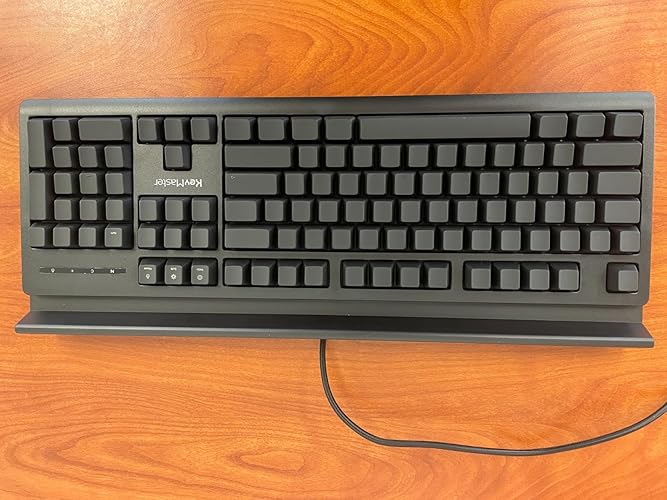

The 15 Unit CASE Learn to Type Keyboard has garnered a mixed reception among customers, with a significant portion praising its innovative features while others express concerns about its design and usability. Many users appreciate the keyboard's unique capability to blackout key lettering, which is particularly beneficial for educators and students learning to type. The responsive linear switches offer a satisfying tactile experience, making it a pleasure to use whether for gaming or typing practice. This feature allows users to focus on specific keys while hiding others, which is ideal for teaching touch typing without distractions. Educators have particularly highlighted the potential of this keyboard in classroom settings. The ability to turn individual key lights on or off enhances the learning experience for students, adapting to their varying typing needs. The sturdy build and professional appearance contribute to its appeal in both home and classroom environments. However, not all feedback is positive. Some users have encountered issues with key layout alterations that disrupt standard keyboard functionality, such as the removal of dedicated media keys and unexpected key substitutions. Criticism also arises around the keyboard's overall layout, making it less suitable for those looking for a primary keyboard. Customer service responses have been noted positively in instances of malfunctioning units, indicating a reasonable level of support for buyers. Overall, while the keyboard excels as a learning tool, its practicality as a general-use keyboard is debated, leading some to recommend it strictly for educational purposes. **
Customer Reviews & Ratings
57 customers ratings
-
5 Star
71%
-
4 Star
8%
-
3 Star
3%
-
2 Star
8%
-
1 Star
10%
Review this product
Share your thoughts with other customers
Pros
- Innovative blackout feature for learning to type
- Responsive and satisfying tactile feedback with linear switches
- Sturdy and professional design suitable for different environments
- Great for educators and students in typing practice
Cons
- Non-standard key layout with missing and replaced keys
Product Price History
Important information
- Limitations : For products shipped internationally, please note that any manufacturer warranty may not be valid; manufacturer service options may not be available; product manuals, instructions, and safety warnings may not be in destination country languages; the products (and accompanying materials) may not be designed in accordance with destination country standards, specifications, and labeling requirements; and the products may not conform to destination country voltage and other electrical standards (requiring use of an adapter or converter if appropriate). The recipient is responsible for assuring that the product can be lawfully imported to the destination country. When ordering from Ubuy or its affiliates, the recipient is the importer of record and must comply with all laws and regulations of the destination country.
- Not all the products listed on Ubuy are for sale, as Ubuy is a global search engine. Products are subject to export/trade regulations.
ZAR 1855
Order now and get it around Saturday, July 25
This item is not restrict in my country.(Please click on above link if this item is not restrict in your country, So our team will review and allow.)
QTY:
Only 11 items left in stock.
Secured transaction
PCI DSS compliant and ISO 27001:2022 certified, with encrypted payments and full buyer protection on every order.
Our Top Logistics Partners
Fastest cross-border delivery
Features & Benefits
- Eliminate dependence on looking at keys with innovative backlighting.
- Features a dual-purpose show/hide key system for effective learning.
- Designed by experts, ideal for touch typing practice for all ages.
- Ergonomic design with durable aluminum frame for long-lasting use.
- Compatible with all major operating systems and educational software.
- Improves typing precision, speed, and finger placement over traditional solutions.
Ubuy Assurance
Experience worry-free shopping with 100% original products, PCI DSS-compliant payment security, ISO 27001-certified data protection, the fastest cross-border delivery, free returns *, and secure packaging on every order.